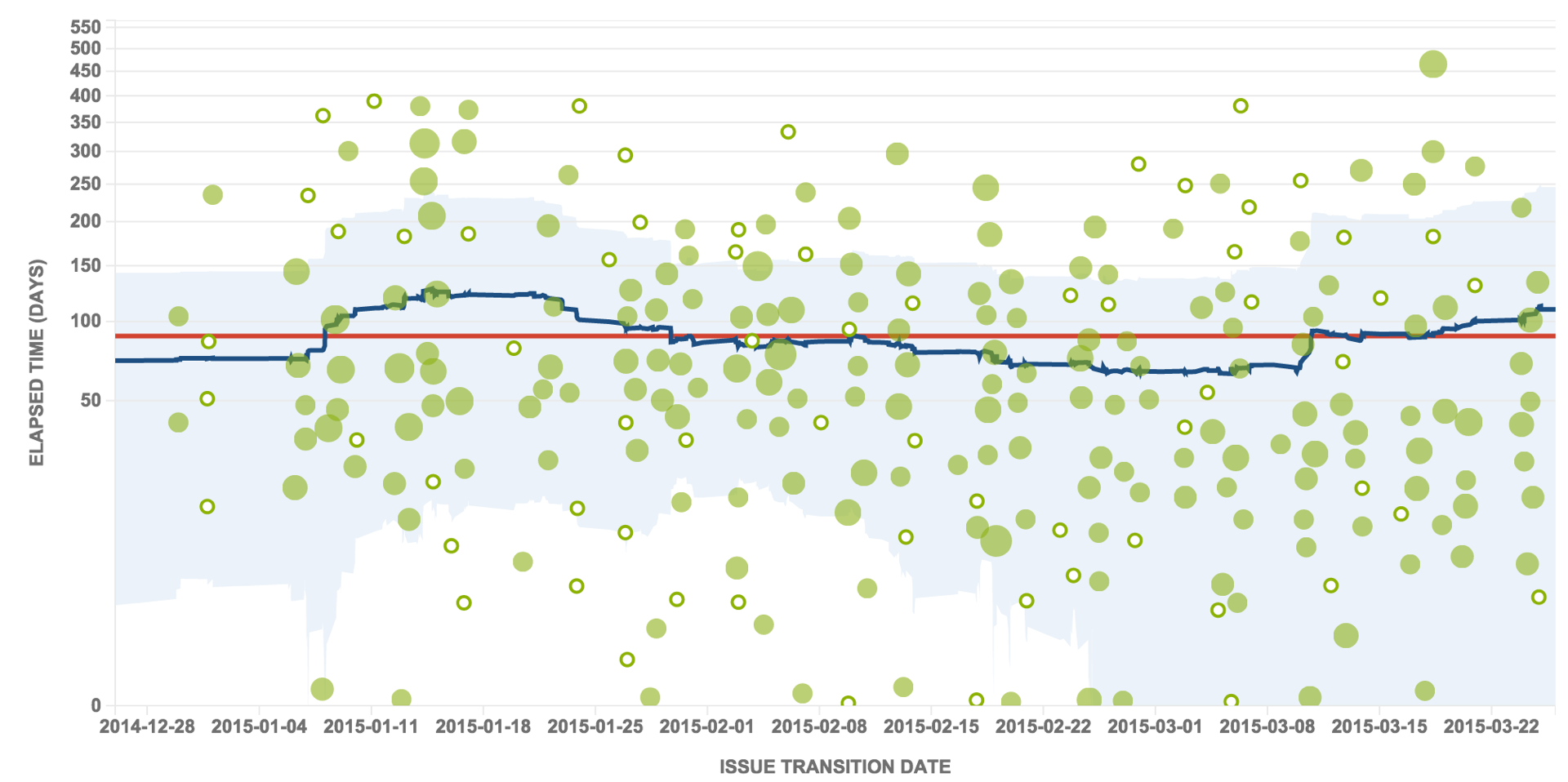
Following on from Part 1 where we explored how GreenHopper is used by Kanban teams to be Agile and continually improve. GreenHopeer Kanban boards make it easy for any team – be they in software development or customer support – to get started quickly and start realising the benefits of being agile immediately. In Part 2 we introduce work in progress limits to minimise context switching and measure cycle time to provide predictability to our customers.

Continue Reading...

Since the release of GreenHopper 6.0 teams have been able to take advantage of new Kanban boards (formerly called Rapid Boards). These Kanban boards make it easy for any team – be they in software development or customer support – to get started quickly and start realising the benefits of being agile immediately. One of the key tennets of Kanban is that you don’t start by changing everything. Instead, you start by measuring the current process and then begin to explore areas for improvement. Start with what you have today and incrementally improve from there.

In this post we’ll look at how teams can take advantage of the power and flexibility of GreenHopper to help them get work done.

Continue Reading...

I had been looking for a way to visualise epics across a number of teams and programs in JIRA and GreenHopper. I want to highlight those epics which are blocked. What I have settled on is a combination of JIRA, GreenHopper and an add-on for JIRA called JQL Tricks.

First off, picture a company with X strategic goals for the year. These goals are shared across the company and engineering departments use them to set their quarterly goals. Break down the departments and each team sets their goals, again that align with the company goals. These team level quarterly goals are represented by Epics in GreenHopper. The higher level goals are listed on a Confluence page.

Further, the achievement of some teams goals depends on other teams. And the company wants to map the strategic goals down to the tactical work that each team is up to. Of course, each team should be working on the highest value goal at the start of the quarter, so that if the team is to miss achieving any goal it is the least important.

Providing visibility for the management team is a great way to minimise disruptions to engineering teams – all the information is there in JIRA, let’s just bubble it up to something that is sensible for the management team. So, we don’t want to provide visibility for the stories in a sprint, instead we want to visualise a roll up of epics (team goals).

Visualising Epics

Start by creating a Kanban board in GreenHopper with a simple three column mapping – To Do, In Progress, Done. Change the filter on which the board is based to use the following query:

“Epic Status” = Done or “Epic Status” is not Empty ORDER BY Rank ASC

The filter configuration then looks like this:

GreenHopper Kanban board configuration for visualizing epics

Note: The Work Sub-Filter takes those epics/goals completed in the last quarter off the Work mode of the board while still making them available on the Report mode (more on this below).

Once you have the board and filter set up you’ll see this:

GreenHopper Kanban board - To Do, In Progress, Done, for managing goals

Epics. To Do. In Progress. Done. Easy.

Dependency Management

Next up, we need to visualise the dependencies. I want to highlight those epics that are blocked – again, we’re focusing on the highest value goals at the start of the quarter, so if anything falls off the list it is the lowest value. Trouble is, if we’re dependent upon another team and they are not aware of it (or not working on the corresponding goal early enough in the quarter) we may miss two high level goals. This is where the JQL Tricks add-on saves the day.

JQL Tricks provides some fancy JQL queries which help us find the dependencies. I started out with:

project in (“XYZ”, “ABC”) AND issue in linkedIssuesHasStatus(“Open”,”is blocked by”)

This JQL query searches for all issues in the project XYZ and ABC that have a linked issue that is Open and where the link is of the type ‘is blocked by’. It turns out that JIRA runs two queries on the search index for this query – before and after the ‘AND’ – and then finds the ones that match both halves. This is an expensive search query on large JIRA instances.

Thankfully, the team at J Tricks (kudos fellas, thanks for the help!) sorted me out by suggesting the following:

issue in linkedIssuesInQuery(“status = Open and project in (XYZ, ABC)”, “is blocked by”)

This means that it does the search for issues linked by ‘is blocked by’ on ONLY those issues that match the first query – ‘status = Open and project in (XYZ, ABC)’. This is much faster and gave me the same results. Gold!

Next step, add this to a board. I chose a swimlane for this:
GreenHopper kanban board with swimlane to highlight epics/goals that are blocked

And voila, we can visualise epics across the company and highlight the blockers. You can even turn this into a nifty JIRA Wallboard and put on a TV next to the management team.

Cycle Time

Cycle time is the amount of time that an issue spends in progress – in this case the amount of time that an epic takes to be completed from when we start working on it. You can use the Control Chart to visualise this, unfortunately I don’t have enough data around this yet. Stay tuned for an update in a quarters time.

Next Steps

I’m still trying to figure out if I need an In Progress column. Perhaps Epics are only in two states: To Do, and then Done. If you have any thoughts please share them in the comments below. Of course, to get the cycle time I may need to keep this and do something with the workflow in JIRA to push the Epic into In Progress when we start working on the first issue linked to that Epic… more on this in the future.

Finally next thing is highlighting the Epic Reports (another great feature that GreenHopper gives product owners, and which can help the management team). Here is an example from one of those epics on the board above:
GreenHopper Epic Report - Are we nearing completion of the teams quarterly goals?

Note: today you can only get to this report via the associated Scrum board as there is no Epic Report on the Kanban board. The GreenHopper Team has a story on their backlog that will make this easier – vote on that.

So, that’s one way of visualising epics and dependencies with JIRA and GreenHopper.

How do you do it? What am I missing? Share your thoughts in the comments below.

This was a presentation given by Samantha Thebridge at UX Australia in 2012 – Developers will design: Let’s make them amazing at it. She touches on a number of the tactics the design team at Atlassian used to get the developers to think like designers as they build new features. Definitely worth a watch.

Continue Reading...

Electronic User Story Maps?

December 31, 2012

I received a great question from a customer today regarding user story mapping:

Quick q, are there any plans / thoughts on adding a higher level board for User Story Mapping ( vs. releases etc ) based on Jeff Patton’s work / ideas. We are struggling to communicate at a higher level epics vs stories vs projects vs priorities and after giving this a try ( manually using cards ) it appears to be really powerful.

The customer goes on to share that they are looking at using Agile StoryMaps, an add-on for JIRA and GreenHopper. I wasn’t aware of this add-on previously so it was cool that the customer brought it to my attention.

The GreenHopper team has looked at user story mapping a few times over the past three years. We create a story map whenever we tackle a big piece of new functionality – epics, or release planning, for example.
What struck us every time we explored adding this to GreenHopper was that creating the user story map is:
  1. something you do at the start of a new project/epic, rather than an on-going task
  2. very collaborative with the whole team getting involved, walking around, creating paper prototypes and so on
For these reasons we have stuck to physical cards and avoided the projector during a user story mapping session. However, now that we know about the Agile StoryMaps add-on we’ll be sure to take a look and see if we can retain the collaborative nature of these meetings.
Have you tried it? Tweet me and let me know.


I was just writing a response to a question posed on a GreenHopper documentation page. It is worth sharing more broadly as I’ve seen similar queries a few times recently.

The fact that I can drag and drop inside a sprint, from one unstarted sprint to another, from one unstarted to start sprint, but not out of a started sprint is extraordinarily frustrating. Right now for each issue I want to move, I am forced into a baffling 5-click process. JIRA seems to follow a pattern of design decisions that favor a strict workflow ideology over basic concerns over user experience and functionality. Atlassian should penalize incorrect workflows passively, by allowing me to do things but give me a note/alert afterwards (“Hey, doing that screws up reporting, next time try organizing your sprints better”) not actively hinder basic functionality like drag-and-drop.

Anonymous

The ability to drag a story out of a current sprint is not something we have included in GreenHopper. However, teams can still remove a story from a current sprint if they really must, as the person above stated. We’re not trying to penalise people in GreenHopper though. We are trying to encourage teams to be more effective and follow ideal behaviour.

In this case we’re encouraging teams to commit to deliver something in a sprint and stick to it. This will help the teams attain predictability over time.

What I’m finding is that some teams are constantly adding stories to, or removing stories from, a current sprint. My normal reaction is: People! Have you no discipline? The reason the team estimates is give them confidence they can deliver what is in that sprint at the end of the sprint. This goes back to one of the principals of Agile – deliver working software frequently.

Why would a team commit to and start a sprint if they didn’t think they could deliver it? An alternative approach is to commit to less, and pull work into a sprint if the team complets every story in the sprint before they thought they would.

Either way, the team can see this scope change in the burndown chart.

Screen Shot 2012-11-30 at 12.11.05 PM

When the team removes a story from a sprint in GreenHopper still shows the original commitment on the velocity chart. The velocity chart shows the teams commitment (grey) and delivery (green) for each sprint that has finished. Within 3 – 6 sprints the team should have a pretty good understanding what they can deliver in a sprint.

Screen Shot 2012-11-30 at 12.33.39 PM

So, while you may adding stories to, or removing them from, sprints today I encourage you to have more discipline and stop this behaviour. It is not ideal over the long term.

Start by committing to less and I am confident that over time the team will arrive at more appropriate sprint commitments. The upshot is that you will also have more predictability around delivery, which is sure to please customers.

I have also posted this on the Atlassian blog.